Goals
- Get measurements from the user
- Scale the asset to fit the given measurements
Relevant Swift Class Documentation
- ARHitTestResult - Get the location from the user on a real world surface
- SCNNode - Representation of position and transform in a 3D coordinate space
Link to Project
I've uploaded the code for this post on my Github.
Setting Up the View
I've set up an ARSCNView in which ARKit will be run, I did this by creating my project as an Augmented Reality project.
I've added two labels to the screen that I will attach the calculated width and depth measurements to.
Getting the Measurements From the User
To get the measurements from the user I'm going to place three nodes on the screen. The distance between the first two nodes will represent the width and the distance between the second and third node will represent the depth.
When the user taps the screen I will place a node at the location of the ARHitTestResult.
var dotNodes = [SCNNode]()
@IBAction func OnTapGesture(_ sender: UITapGestureRecognizer) {
    let tapLocation = sender.location(in: sceneView)
    //get location of touch once cast to next feature point it hits

    let hitTestResults = sceneView.hitTest(tapLocation, types: .featurePoint)

    if let hitResult = hitTestResults.first {
    addDot(at: hitResult)
    }

    if dotNodes.count == 3 {
    addAsset()
    } else if dotNodes.count > 3 {
    resetScene()
    }

}

func addDot(at hitResult: ARHitTestResult ) {
    let dotGeometry = SCNSphere(radius: 0.005)
    let dotMaterial = SCNMaterial()
    dotMaterial.diffuse.contents = UIColor.red
    dotGeometry.materials = [dotMaterial]
    let dotNode = SCNNode(geometry: dotGeometry)

    dotNode.position = SCNVector3(hitResult.worldTransform.columns.3.x, hitResult.worldTransform.columns.3.y, hitResult.worldTransform.columns.3.z)
    sceneView.scene.rootNode.addChildNode(dotNode)
    dotNodes.append(dotNode)
}
Doing Some Geometry
I've added a utility class to manage some of the math that the program will need to execute.
func getAverage(x: Float, y: Float) -> Float {
    return (x + y) / 2
   }
func getScale(originalMeasurement: Float, newMeasurement: Float) -> Float {
    return newMeasurement / originalMeasurement
}

func getMiddle(n1: Float, n2: Float) -> Float{
    return (n1 + n2) / 2
}
func calculateDistance3D(start: SCNNode, end: SCNNode) -> Float {
    //3d pythagoras
    //√(a^2 + b^2 + c^2)
    let a = end.position.x - start.position.x
    let b = end.position.y - start.position.y
    let c = end.position.z - start.position.z

    let distance = sqrt(pow(a, 2) + pow(b, 2) + pow(c, 2))

    return abs(distance)
}
Scaling the Asset
Once we have retrieved our three nodes representing width and depth we can scale the asset and insert it into our scene.
    func addAsset() {
    //get window measurements
    let width = calculateDistance3D(start: dotNodes[0], end: dotNodes[1])
    let depth = calculateDistance3D(start: dotNodes[1], end: dotNodes[2])

    //display measurements
    WidthLabel.text = "Width: \(width)"
    DepthLabel.text = "Depth: \(depth)"
    WidthLabel.textColor = UIColor.black
    DepthLabel.textColor = UIColor.black

    //get model scale
    let scaleX = getScale(originalMeasurement: boundingboxWidth, newMeasurement: width)
    let scaleZ = getScale(originalMeasurement: boundingboxDepth, newMeasurement: depth)
    let scaleY = getAverage(x: scaleX, y: scaleZ)

    //get model node placement location
    let centerX = getMiddle(n1: dotNodes[0].position.x, n2: dotNodes[1].position.x)
    let centerY = dotNodes[0].position.y
    let centerZ = getMiddle(n1: dotNodes[1].position.z, n2: dotNodes[2].position.z)

    //get rid of the dots
    dotNodes.removeAll()
    sceneView.scene.rootNode.enumerateChildNodes { (node, stop) in
    node.removeFromParentNode()
    }

    //add model to scene
    if let tvScene = SCNScene(named: "art.scnassets/crtv.scn") {

    if let tvNode = tvScene.rootNode.childNode(withName: "tv_retro", recursively: true) {

    tvNode.position = SCNVector3(centerX, centerY, centerZ)
    tvNode.scale = SCNVector3(scaleX, scaleY, scaleZ)

    sceneView.scene.rootNode.addChildNode(tvNode)
    print("add node to scene")
    }
    }
    }
That's It!
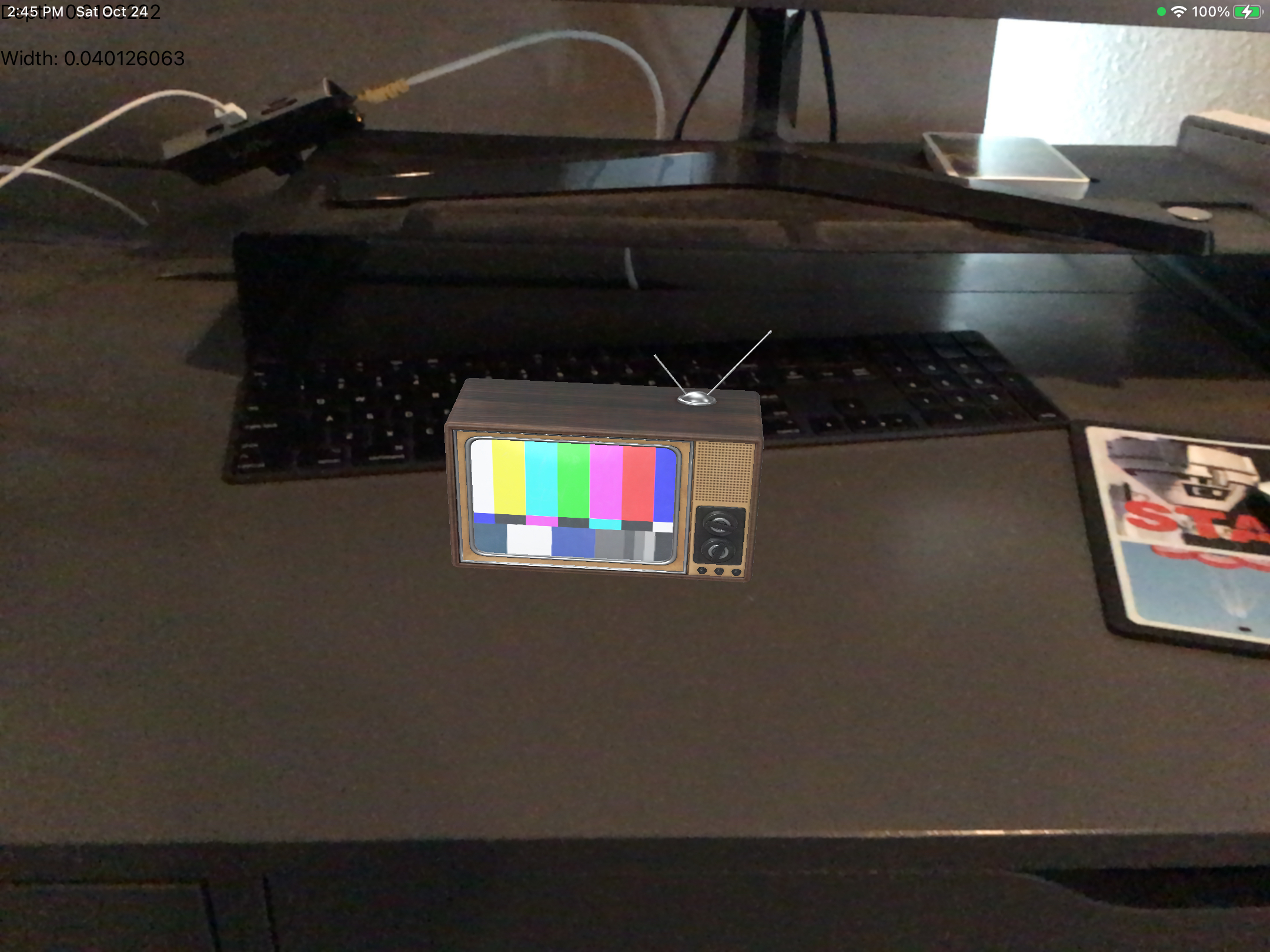
Here's an example from the project I've attached. I've placed this retro tv on my desk at a scale specified by my node placement.
Rocco Daigler
Web developer
Hi! I'm a professsional .NET developer as well as an avid hobbyist in Swift developement. I enjoy finding complex business processes and translating them into software solutions. I put this site together so that I could share code snippets for difficult problems that I was unable to find resources for. I hope there's something here that can help you!